Posts

Showing posts with the label PowerShell

Azure SQL Server IaaS: A quick approach to resolving collation conflict.

In this post I would like to highlight that approach that you can take to resolve the following error that you might get after restoring your on-prem SQL Server database(s) to Azure SQL Server IaaS: Cannot resolve the collation conflict between We were getting the error because the Azure IaaS SQL Server default collation is: SQL_Latin1_General_CP1_CI_AS. Our on-prem default is Latin1_General_CP1_CI_AS. And our SQL code wasn’t setting an explicit collation for joins between temp tables and physical database table for character columns. For the UK SQL Server install the server collation default is Latin1_General_CP1_CI_AS when the windows host language and location are set as English United kingdom. We also didn’t have time to go through all our SQL code to find where we need to add explicit collation. The decision was to change SQL Server default collation to Latin1_General_CP1_CI_AS To set the SQL Server collation to default can be done using this command on the Azure VM: .\ C :...

Mapping Azure files share for Azure SQL Server IaaS

As mention in a previous post: A Gotcha when using the Azure SQL Server IaaS.   I am working on moving our company product to the Azure Cloud and having to use Azure SQL Server IaaS. In this post, I will share how I used the Azure VM Custom Script Extensions to map a drive to Azure file share accessible for SQL Server services. I couldn’t use the Azure portal script:  1 2 3 4 5 6 7 8 9 $connectTestResult = Test-NetConnection -ComputerName mystorageaccount.file.core.windows.net -Port 445 if ($connectTestResult.TcpTestSucceeded) { # Save the password so the drive will persist on reboot cmd.exe /C "cmdkey /add:`"mystorageaccount.file.core.windows.net`" /user:`"Azure\mystorageaccount`" /pass:`"mystorageaccount.file.core.windows.net key `"" # Mount the drive New-PSDrive -Name Z -PSProvider FileSystem -Root "\\mystorageaccount.file.core.windows.net\myfileshare" -Persist } else { Write-Error -Message "Unable to r...

A Gotcha when using the Azure SQL Server IaaS

I am currently working on moving our company product to Azure Cloud.  In this post, I am going to share a gotcha I came across with our Azure SQL Server IaaS. For our product, we have to use Azure SQL Server IaaS for a few reasons:  The way our SSIS projects have been developed like: using DTC,  Office drivers and file operations; We have a few cross-database queries within our Store procedures; A fair bit of automation using SQL Server Agent. I have been helping to create our Azure infrastructure using Terraform and ARM templates to build our Azure SQL Server IaaS.  Getting our SQL Server made was reasonably straightforward.  The gotcha was when we looked at the results: The SQL Server agent was installed but not started and the start-up for the service set as manual.  As mentioned, we use SQL Server agent to automation a few processes within our product; this wasn't the desired state also I must admit I have forgotten that this is SQL Server Agent default...

Loading SQL Server PowerShell Module tip

Image
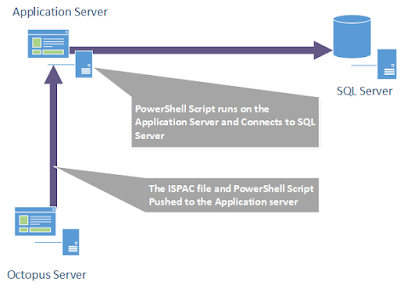
As mentioned in previous posts: Automating building of SSIS projects Automating deployment of SSIS projects I have been working on integrating our SSIS projects into our continuous delivery pipeline using Octopus, PowerShell and the SQL Server PowerShell module. In this post I will cover how I had to resolve the following error: New-Object : Cannot find type [Microsoft.SqlServer.Management.IntegrationServices.IntegrationServices]: verify that the assembly containing this type is load. I'm going to start explaining the contributing factors which led me to getting the aforementioned error: Where the script is executed What the script does. Where the script is executed As part of the deployment pipeline, we decided not to install tentacles on our SQL Servers. To deploy our SQL Server changes we use one of our application servers, to receive Octopus packages like our SSIS projects, SQL Scripts, then the application server runs the deployment PowerShell scripts to update ...

Automating deployment of SSIS projects

Image
As mentioned in the previous post: Automating building of SSIS projects , I am working on integrating our SSIS projects into our continuous build/deployment process. In this post, I will cover my implementation of automating the deployment of SSIS projects. Our continuous delivery pipeline uses the Octopus Deploy platform which is a release management; automated deploy and operation runbook platform that consists of a central server and deployment agents referred to as tentacles. The tentacles receive the deployment packages, which contains the code being deployed, and runs the deployment scripts. The server is where all the deployment packages are stored; deployment projects are maintained and the management of the following: infrastructure, users and server. Octopus deployment projects are defined as steps from one of the following templates types: Built-in, custom or Community ...

Automating building of SSIS projects

I am currently working for a healthcare solutions company on one of their leading products. Presently we are working on improving our continuous build/deployment processes. I have been looking into how to include all our SQL Server Integration Services (SSIS) projects and would like to share the approach taken for the continuous build in this blog post. Automating the build of SSIS project(s) is not as straightforward as it is for the .Net projects. One of the main barriers is that for SSIS projects there is no native support in the visual studio standard build tool (MSBuild). If you wish to use MSBuild you would need to write your own build file with a custom extension library that you would have either created yourself or downloaded from a community/open source code sharing site.My approach was to use PowerShell to do the following: Read an XML config file which has the solution and projects files paths along with build configuration. Find the path to visual studio. By using...

Automating SQL Server Database projects Deployment

Within this post I wish to share the methods I used to automate the deployment of my SQL Server database projects.  I needed to automate the deployment of my database projects within the build process so I could integrate the execution of my unit tests. As mentioned in a previous post: Integrating TSQLT with Team Foundation Build Services continuous build .  I also wanted to automate the deployment into the development, test and production environment for the following reasons: To empower the developers to do database deployment into the required environment and reducing the dependence on me. To reduce the complexity of deploying the database projects. To have an easy deployment process to document i.e. run this script. In a way to document the deployment of the database projects. Before I start I would like to highlight an invaluable project / solution file(s) that help with the automation.  These are "Profiles" which are used as configuration files for deploym...

Waking up Reporting Services with scripting

I have recently deployed a new reporting solution using SQL Server 2008 Reporting Services. I wanted to look into a solution to ensure that the first user, after reporting services had spun down its’ application pools, doesn't have to wait for them to be re-initiated. This so that I could avoid complaints about reporting services performance. I was looking for a simple solution to either stop reporting services clearing down the application pools or to find a way of speeding up the first request. I decided on an approach to speed up the first request made by a user. This was because I didn't want to make application settings changes in case other problems occurred. After searching for a method into speeding up reporting services application pools start-up I came across a useful PowerShell script. The script, which was for PowerShell V2, made use of the .Net class System.Net.WebRequest to make a request to the report manager. I made a copy of this script and applied some ...

SQL Server maintenance via PowerShell

I was asked to help create a maintenance plan for a SQL server . I chose to implement the plan using PowerShell for the following reasons:  PowerShell is a procedural scripting language and the maintenance plan would have a few procedural steps and iterations through objects. PowerShell was also built on top of the .Net framework. This means I could make use of the SQL Shared Management Object (SMO) library within my script. SQL Server also has a SQL PowerShell provider , which is pre-loaded when you run SQLPS. Support also has been extended to SQL Server Agent as there is a native PowerShell, which uses SQLPS, job subsystem. I have been using PowerShell for a while and found it really useful; it allows you to solve problems, much more easily, than using the standard SQL tools. A copy of my script, and related scripts, are available from my SkyDrive using the following link: OneDrive The maintenance script, SQLServerMaintanceTask.PS1 , does the following, depending o...

A Business Intelligence project ALM's

Image
Table of Contents 1   Introduction. 2   Automation process components   2.1 The Build.   2.2 The Deployment script.   2.3 Automated deployment and execution. 3   Visual studio tips.   3.1 Reducing unresolve reference errors.   3.2 Composite Projects. 4   Resources. 1 Introduction As I have mentioned in previous posts I have been working on a data warehouse project. One of my main roles in this project was to work on the build, deployment and development processes. Within this post, I would like to show how I, with help from my colleagues, was able to automate a build, deployment and execute the data warehouse code. The reason for developing this automation was to try and find problems before we released to user acceptance testing (UAT). Once this automation started running it did capture errors. One error in particular, which would only appeared in release, was missing permissions. As the developers a...

Using Powershell to understand a replication topology

I recently had to investigated a client replication topology.  I needed to understand the publications, subscribers and the articles. The problems I was facing were as follows: The replication topology was only defined on the production infrastructure. There was no documentation about the replication topology. I had no way of being able re-create replication topology. Only short amount of time. I was able to script the replication topology from the SQL Server Management Studio.  This was partially helpful as I now had a script which could be used to review the replication topology.  However this end up being a fairly large file and would be time consuming to review all information.  So I deicide to write a PowerShell, SQL Server Powershell for the Invoke-Sqlcmd commandlet, that would do the following steps: Parse the file to find the lines containing the following store procedures: sp_addarticle. sp_addsubscription. ...