Posts

Showing posts with the label SSIS

Azure SQL Server IaaS SSIS: A required privilege is not held by the client

Image
As mention in a previous post, we are using Azure SQL Server IaaS to help our transition to the cloud. The main reason for this is how some of our SSIS projects, which we inherited, were created. Some were using SSIS to manage the transactions, which uses MSDTC not supported in Azure. Use extra .Net libraries to read JSON and office files; external programs to do file operations like decompression. Migration timelines and priorities we didn't have time to refactor these projects. While ago we started to deploy our SSIS projects to our Azure SQL Server IaaS virtual machine, a Windows 2019 server with SQL Server 2019, to get the following error: SSIS Deployment Error 6522 "A required privilege is not held by the client". We able to resolve our problem by using the steps we found in the following blog posts: System.ComponentModel.Win32Exception: A required privilege is not held by the client while Deploying SSIS Project | Microsoft Docs . Fixing SQL 2012 SSIS Deployment Err...

Loading SQL Server PowerShell Module tip

Image
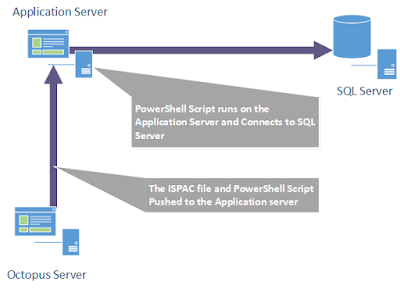
As mentioned in previous posts: Automating building of SSIS projects Automating deployment of SSIS projects I have been working on integrating our SSIS projects into our continuous delivery pipeline using Octopus, PowerShell and the SQL Server PowerShell module. In this post I will cover how I had to resolve the following error: New-Object : Cannot find type [Microsoft.SqlServer.Management.IntegrationServices.IntegrationServices]: verify that the assembly containing this type is load. I'm going to start explaining the contributing factors which led me to getting the aforementioned error: Where the script is executed What the script does. Where the script is executed As part of the deployment pipeline, we decided not to install tentacles on our SQL Servers. To deploy our SQL Server changes we use one of our application servers, to receive Octopus packages like our SSIS projects, SQL Scripts, then the application server runs the deployment PowerShell scripts to update ...

Automating deployment of SSIS projects

Image
As mentioned in the previous post: Automating building of SSIS projects , I am working on integrating our SSIS projects into our continuous build/deployment process. In this post, I will cover my implementation of automating the deployment of SSIS projects. Our continuous delivery pipeline uses the Octopus Deploy platform which is a release management; automated deploy and operation runbook platform that consists of a central server and deployment agents referred to as tentacles. The tentacles receive the deployment packages, which contains the code being deployed, and runs the deployment scripts. The server is where all the deployment packages are stored; deployment projects are maintained and the management of the following: infrastructure, users and server. Octopus deployment projects are defined as steps from one of the following templates types: Built-in, custom or Community ...

Automating building of SSIS projects

I am currently working for a healthcare solutions company on one of their leading products. Presently we are working on improving our continuous build/deployment processes. I have been looking into how to include all our SQL Server Integration Services (SSIS) projects and would like to share the approach taken for the continuous build in this blog post. Automating the build of SSIS project(s) is not as straightforward as it is for the .Net projects. One of the main barriers is that for SSIS projects there is no native support in the visual studio standard build tool (MSBuild). If you wish to use MSBuild you would need to write your own build file with a custom extension library that you would have either created yourself or downloaded from a community/open source code sharing site.My approach was to use PowerShell to do the following: Read an XML config file which has the solution and projects files paths along with build configuration. Find the path to visual studio. By using...

A Business Intelligence project ALM's

Image
Table of Contents 1   Introduction. 2   Automation process components   2.1 The Build.   2.2 The Deployment script.   2.3 Automated deployment and execution. 3   Visual studio tips.   3.1 Reducing unresolve reference errors.   3.2 Composite Projects. 4   Resources. 1 Introduction As I have mentioned in previous posts I have been working on a data warehouse project. One of my main roles in this project was to work on the build, deployment and development processes. Within this post, I would like to show how I, with help from my colleagues, was able to automate a build, deployment and execute the data warehouse code. The reason for developing this automation was to try and find problems before we released to user acceptance testing (UAT). Once this automation started running it did capture errors. One error in particular, which would only appeared in release, was missing permissions. As the developers a...

Integrating a rules engine with integration services

Image
Introduction As I have mentioned in several previous posts, I have been working on a data warehouse project. One of my main roles within this project was to work with our clients JRules / Java consultants to help integrate IBM JRules, a rules engine, with Microsoft SQL Server 2008 R2: Integration Services (SSIS). The goal of the integration was to have the rules engine as part of the ETL process to help evaluate business rules. The reasons to use a rules engine within the ETL process were as follows: To allow business people to write the business rules for the data warehouse in a language they know: English To give the business people the responsibility for maintaining the rules to ensure that the data warehouse is up to date. To be able to update the rules without having to deploy the entire ETL solution. IBM JRules was used within the project because it was already in use within their organisation. The challenge was how to cross the divide between Java and Microsoft .Net...

Source system data to warehouse via CDC.

Image
Introduction I have been working on a data warehouse project with a difference. The difference is that the ETL is not doing the classic extract of source system data, instead the source system is going to send its data to the data warehouse by using change data capture (CDC). The decision for using CDC was as follows: To have the ETL only process the data that has changed within the source system between each run of the ETL. This would help the ETL perform as it would only have to process the change data and not work out what the changes were first. Not to have the ETL processes impact the central source system database. The CDC would be responsible for delivering the changes of the source system to another database server. Then the ETL could be run at any time within the day and wouldn't be responsible for blocking the transactional source system. As there was plans to have the ETL run at the end of the day for two time zones e.g. US and UK. I would like to share some o...

Unit Testing Report within Reporting Services: My Theory

I have been working with Microsoft SQL Server Reporting Services, since its first release, within many of my projects.  One of the biggest tasks, that I find with writing a report is the testing the reports and making sure the data that is displayed is correct.  My method of developing and testing reports is as follows: Write the queries, outside Reporting Services, for creating the report data set(s) with the parameters defined which will be configured within the report. Define the parameters that report data set would create and assign a valid value. Execute the queries. Inspect the results to make sure that they meet the expected results. Repeat with a new valid value or fix any issues. After one or two or even three passes that have worked then I take the queries and put them into report data sets. Then I define the report layout. Then I preview the report make sure it’s still correct Then I release to our te...

SSIS Creating Synchronous Transform Component

Do you need to write a custom component to transform input data, and disregard this input data, instead, replacing it? That's was what I needed to accomplish with my component. It takes data from the input buffer and performs a lookup via an external API. If there is a match, send the result data down a "match" output otherwise send the input data down a "unmatch" output. The key here is that the "shape" of the output was changing. In other words, the metadata of the output was very different from that of the input.I also want my component to be synchronous (meaning synchronous, I mean that the component takes a row, processes it and then immediately sends it down an output) and not asynchronous (meaning that it reads all the data and then processes the data in an internal buffer). Now from what I was reading and seeing this was what I thought SSIS meant by synchronous and asynchronous components, but I was wrong! An asynchronous component can either...

SSIS File handle leak in For Each Loop

I am currently working on a project which needs to load over a 1000 xml files. The files are stored across 10 subfolders. I am using a foreach loop with a file enumerator, which is configured at the top of the folder structure and traverses the subfolders. This loops through the files, load the data and then moves the file to another folder. The package executes fine for a few 100 files but then hangs; this happens after a different number of processed files each time the package is run. While trying to resolve the problem we ran performance counters and noticed that the number open handles increased significantly just about the time Dtexec looked like it had hanged and DTexec also then started taking a lot of the cpu processing time. Update: I put this on the Microsoft forums and got a intresting answer back See Here ; There seems to be a memory leak with foreach loop which should be fixed in sp1.

SSIS Connection Object and Expressions

I have been writing a custom source adapter that uses a file connection within the connection manager. If I hard-code a specific file then the component works. However if I use a file connection that has an expression defined which updates the connection, for example when you have a for-each loop looping over a set files. The file connection doesn’t seem to re-evaluate expression each time you access the file connection via the code.

SSIS Variable Deadlock

I have noticed a problem with the script task within SSIS. The problem occurs when a script task encounters an error and the SSIS on-error event also has a script task that uses a variable that is being locked by the script task that raised the error. The problem seems to be that the SSIS on-error event fires and runs before the script task that raised the error has finished and released its lock on the variable. I have even tred to overcome this problem by using a try/catch block to release the variable locks but this also failed to resolve the problem.

SSIS Changes Database Settings

I have a SSIS package with a simple data flow task, which takes data from a flat file and loads it to an OLE-DB destination (which is configured to use Native OLE-DB\Native Client). As I ran the package via the command-line I noticed that SSIS made changes to the database options. One of the most important options that were being changed was the database recovery model which was modified to run under Bulk-Logged. This changing of the recovery model could cause problems for the back-up and recovery procedure if you are using incremental transaction log back-up as Bulk-Logged will not allow this to run. I can understand why SSIS makes this change because Bulk-Logged does not write any data to the transaction log for Bulk operations. For this reason it does not allow incremental log back-ups and always recommends that you do a back-up of the database when you change back to Simple or Full mode.

SSIS XML Task / Source Adapter

I have been working with SSIS using the XML Task and XML Source Adapter. I was getting an error say that an element is was not defined. When I check the XSD, which was using import / include schemas, I found the element was difined but not in the main XSD schema the adapter was pointing to but another schema which was being imported. The probelm was with the schema were the element was defined not being invaild for the XML Source Adapter, that was the real probelm, as soon as I corrected the imported schema the error was resolved. The probelm with the imported XSD schema there was some DTD define at the being of the file and XML Source Adapter does not support a mixture of DTD and XSD.

SSIS Execute SQL Task With VARCHAR(MAX)

While I was using the SSIS Execute SQL Task to return a single row result I getting the following error: [Execute SQL Task] Error: An error occurred while assigning a value to variable "RestoreCmd": "The type of the value being assigned to variable "User::RestoreCmd" differs from the current variable type. Variables may not change type during execution. Variable types are strict, except for variables of type Object!." This was happening becuase I was trying to assgin a varchar(max) result column to SSIS string variable. There are two ways to solve this problem; one is to change the SSIS variable to object and convert each time it used to a string; the second way to solve this is to cast result column to max size limit.

SSIS 2005 and Database Snapshots

I have been looking into the feasibility of using database snapshots as method of rolling back an SSIS package that fails and this is what I found: Creating a database snapshot was not a real problem, there is one issue that you need to be aware of. For each data file within the database that the snapshot is being based on there will have to be a sparse file created for it. I have created a little SQL script that automates the creation of the database snapshot. Rolling back a database to its initial state after a package has errorred is a problem. The method to revert a database back to its initial state with database snapshots is a restore operation. The restore is a full restore, which of course means there can't be any connections while the restore is happening and this can't be done on-line because it might have to take out the primary data file. This is a problem because SSIS connection manager will create connections to the database when the package starts and doesn...