Posts

Showing posts with the label SSDT

Database Projects Topologies

Image
I have been working with Visual Studio Database projects starting with Database Professional to its successor SQL Server Data Tools. Within this post I wish to share some of the project topologies that I have used to manage my project databases requirements Before starting I would like to cover the 2 ways that database projects can be referenced.  As these methods play an important part of the projects topologies without having to develop code. External Referencing When adding a database reference and setting the options of database name or, optional, server name with a literal / variable value will configure the reference as external.  This will mean any SQL objects within the reference will need to be referred by using 3/4 part naming.  Also the referenced DACPAC / project will need be to deployed first, separately, before deploying the current project. Composite Referencing Creating a database reference but not setting the database name / server name will confi...
Automation database deployment with refactored objects

Image
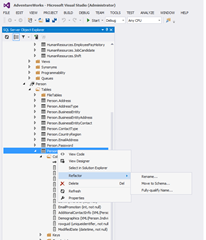
While automating the deployment for my SQL Server Data Tools (SSDT) projects, as mentioned in a previous post: Automating SQL Server Database Projects Deployment , I found it important to create / maintain the projects refactor logs.  This is because SSDT / DAC framework uses the model driven deployment method, which works by comparing the model with the target database to create / execute a delta script for updating the database to match the model.  A problem with is method is miss identifying objects which have been renamed or transferred to a new schema. For code objects like: store procedures, functions, views etc. this would be more of a nuisance as the database will contain redundant code. This would happen if the deployment option DropObjectsNotInSource is not set to true.  This would make it harder to maintain the database and may cause future deployments to fail if schema binding is involved. However for tables or columns, again depending on deployment opti...

Automating SQL Server Database projects Deployment

Within this post I wish to share the methods I used to automate the deployment of my SQL Server database projects.  I needed to automate the deployment of my database projects within the build process so I could integrate the execution of my unit tests. As mentioned in a previous post: Integrating TSQLT with Team Foundation Build Services continuous build .  I also wanted to automate the deployment into the development, test and production environment for the following reasons: To empower the developers to do database deployment into the required environment and reducing the dependence on me. To reduce the complexity of deploying the database projects. To have an easy deployment process to document i.e. run this script. In a way to document the deployment of the database projects. Before I start I would like to highlight an invaluable project / solution file(s) that help with the automation.  These are "Profiles" which are used as configuration files for deploym...

Integrating tsqlt with Team Foundation Build Services continuous build

Image
As I've mentioned in a previous blog post I have been integrating a SQL Server unit test framework: tsqlt into my project life-cycle ( click here to read more ).  Within this post I will share how I got my tsqlt unit tests executing within the continuous integration solution and the results influencing the outcome of the build. The continuous integration platform I am using is Team Foundation Build Services 2012 (TFBS). However my approach will work with any continuous integration platform which handles MS-Build and MS-Test, like Team City. Build Integration As I had created my database unit tests within SQL Server Data Tools (SSDTs) integrating them into the continuous integration was a straightforward process.  By extending the build definition to include the unit test project into the list of solution / projects which have to be built.  As I had my own solution, which was listed within the build definition, for all the database projects and other related projects m...

Integrating tsqlt with SQL Server Data Tools

Image
As mentioned in a previous post I've recently been working with a SQL Server unit test framework: tsqlt. I would like to share how I managed to integrate the framework and unit test into my project life-cycle. Unit tests should be treated the same as application code, meaning they should be contained within a project under source control. Being under source control will allow the tests to be maintained and changes tracked when multiple people are helping to write tests.  Also having the unit test in a project means there is a deployment mechanism out-of-the-box. The tsqlt framework has a few requirement which are as follows CLR is enabled on the SQL Server The framework and the unit test are contained within the same database of the objects which are being tested The database instance is trustworthy As unit test are required to be contained within the same database as the objects being tested, also due to the way SQL Server Data Tools (SSDT) project validation works, th...

Configuring database files within Microsoft SQL Server Development Tools

Image
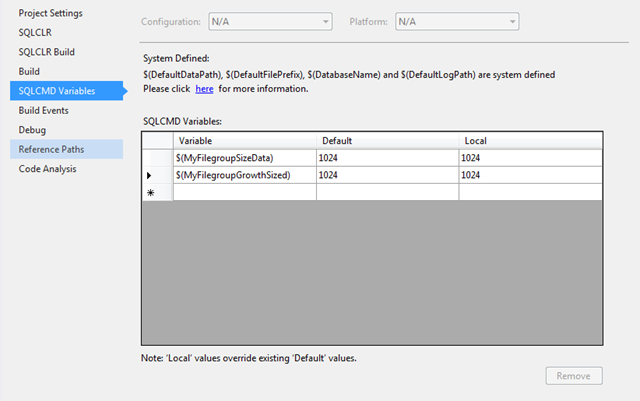
Over the years SQL Server database development has evolved from non-structured tools (Query Analyser/Management Studio) to fully structured development tools (Visual Studio Database Professionals/SQL Server Data Tools). However there many important aspects of database development which hasn't changed over the years. One of which I would like to cover within this blog post is the database files configuration especially within Microsoft development tools: SSDTS and VSDB-Pro. Getting your database files size and growth incorrectly configured can hurt your database performance. As on a project we had our first test release into production of our data warehouse and run our ETL process. At the time the databases had to take on the default file settings of the model database. After the process completed within three hours our data base files all grew in excess of 40GB. We did another test release, after tearing down the environment, with database file settings worked into the deployment ...

Missing the option of creating table dependent objects within separate files

I have been developing database for over 12 years for use with applications and business intelligence projects. One of the challenges I used to face was how to put the SQL Server database under source control.  Over the years I came across several methods: Direct Database development with nightly backup,  Script(s) place under source control, SSMS Projects.  Microsoft help to solved the problem when they release Visual Studio Data Database Professional (DataDude), when Visual Studio 2005 was around,  which add a project structure, development methods, build and deployment methods.   Recently Microsoft has release a new replacement database development tool: SQL Server Data Tools, which has some improvements and some missing features.  One of the missing features is the folder structure choice that which I talk about in another post :  http://zogamorph.blogspot.co.uk/2012/06/how-to-create-old-database-project.html .  Another change is the dr...

Cannot update a database that has been registered as a data-tier application

Within SQL Server 2008 R2 a new feature was introduced, which was the data-tier application database. This feature allow developers / database administrators to package a database schema so that it could be deployed to any other database server and versioned. More about this feature can be found here: http://msdn.microsoft.com/en-us/library/ee240739(v=sql.105).aspx or http://dacguy.wordpress.com/ This feature has been included, as I have just found out, to previous versions: SQL Server 2005 via Services Pack 4 and 2008 via Services Pack 2. However SQL Server Management Studio, for SQL Server 2008, hasn't been updated with the tools for the new feature, you have to use the SQL Server 2008 R2 version. The reason for including the support to the previous version might have something to do with the release of the new SQL Server Data Tools (SSDT), the replacement to visual studio database professional, which uses DAC Packs and the framework to deploy a database. I have been using the...

How to create the old database project folders for SQL Server Data Tools.

I have been working with the new SQL server data tools database project. This is going to be the successor to database professional tool, also known as data dude. There have been several differences to how this product works. One of them is the new tool project folder structure. There is now no folder structure within the project which means any file is automatically created into the root folder of the project. This is unlike database professionals, which had 2 comprehensive folder structures, the options were: by object type folder tree or schema related folder tree. My preference was always the object type folder structure, were script files which contain similar objects were all stored in the same folder e.g.: tables under a table folder, primary keys under the keys folder, views under a view folder etc. If you missed the object tree folder structure, like I have, there is a method to create this structure very quickly within your new data base project by using the following steps...