Posts

Showing posts with the label VSTDB

Configuring database files within Microsoft SQL Server Development Tools
Image
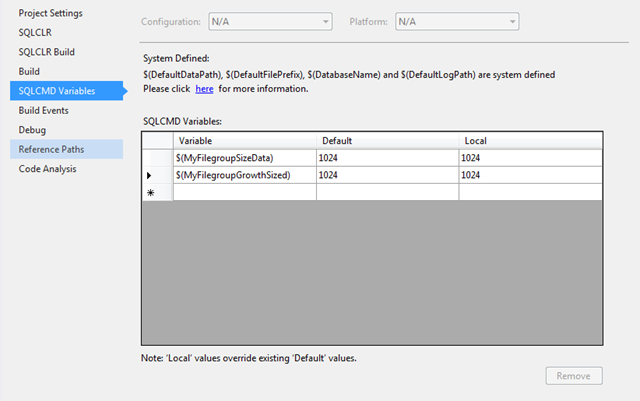
Over the years SQL Server database development has evolved from non-structured tools (Query Analyser/Management Studio) to fully structured development tools (Visual Studio Database Professionals/SQL Server Data Tools). However there many important aspects of database development which hasn't changed over the years. One of which I would like to cover within this blog post is the database files configuration especially within Microsoft development tools: SSDTS and VSDB-Pro. Getting your database files size and growth incorrectly configured can hurt your database performance. As on a project we had our first test release into production of our data warehouse and run our ETL process. At the time the databases had to take on the default file settings of the model database. After the process completed within three hours our data base files all grew in excess of 40GB. We did another test release, after tearing down the environment, with database file settings worked into the deployment ...

Missing the option of creating table dependent objects within separate files

I have been developing database for over 12 years for use with applications and business intelligence projects. One of the challenges I used to face was how to put the SQL Server database under source control.  Over the years I came across several methods: Direct Database development with nightly backup,  Script(s) place under source control, SSMS Projects.  Microsoft help to solved the problem when they release Visual Studio Data Database Professional (DataDude), when Visual Studio 2005 was around,  which add a project structure, development methods, build and deployment methods.   Recently Microsoft has release a new replacement database development tool: SQL Server Data Tools, which has some improvements and some missing features.  One of the missing features is the folder structure choice that which I talk about in another post :  http://zogamorph.blogspot.co.uk/2012/06/how-to-create-old-database-project.html .  Another change is the dr...

How to create the old database project folders for SQL Server Data Tools.

I have been working with the new SQL server data tools database project. This is going to be the successor to database professional tool, also known as data dude. There have been several differences to how this product works. One of them is the new tool project folder structure. There is now no folder structure within the project which means any file is automatically created into the root folder of the project. This is unlike database professionals, which had 2 comprehensive folder structures, the options were: by object type folder tree or schema related folder tree. My preference was always the object type folder structure, were script files which contain similar objects were all stored in the same folder e.g.: tables under a table folder, primary keys under the keys folder, views under a view folder etc. If you missed the object tree folder structure, like I have, there is a method to create this structure very quickly within your new data base project by using the following steps...

A Business Intelligence project ALM's

Image
Table of Contents 1   Introduction. 2   Automation process components   2.1 The Build.   2.2 The Deployment script.   2.3 Automated deployment and execution. 3   Visual studio tips.   3.1 Reducing unresolve reference errors.   3.2 Composite Projects. 4   Resources. 1 Introduction As I have mentioned in previous posts I have been working on a data warehouse project. One of my main roles in this project was to work on the build, deployment and development processes. Within this post, I would like to show how I, with help from my colleagues, was able to automate a build, deployment and execute the data warehouse code. The reason for developing this automation was to try and find problems before we released to user acceptance testing (UAT). Once this automation started running it did capture errors. One error in particular, which would only appeared in release, was missing permissions. As the developers a...

To Collate or not to Collate

Collation plays an important role within the database, as it sets out how the SQL Server has to manage string data within storage & queries, yet I don’t script out the collation when scripting out my databases.   So why don’t I script out the collation if it so important? Its because if the collation is specified but not used properly within the database it can cause some of most common problems, like “Cannot resolve collation conflict for EQUAL TO operation” or “Cannot resolve collation conflict for UNION operation”. These errors are caused when string data within different collations are being compared or combined into the same result set; this is nothing new so why talk about collation now? Well it’s to do with the release of Visual Studio 2005 Team Edition for Database Professionals (VSTDB) something I think needed to be taken in consideration if this is being used to manage the database side of the project.   A cause for theses types of problem is when a table is ...