Posts

Automation database deployment with refactored objects
Image
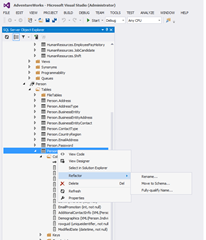
While automating the deployment for my SQL Server Data Tools (SSDT) projects, as mentioned in a previous post: Automating SQL Server Database Projects Deployment , I found it important to create / maintain the projects refactor logs.  This is because SSDT / DAC framework uses the model driven deployment method, which works by comparing the model with the target database to create / execute a delta script for updating the database to match the model.  A problem with is method is miss identifying objects which have been renamed or transferred to a new schema. For code objects like: store procedures, functions, views etc. this would be more of a nuisance as the database will contain redundant code. This would happen if the deployment option DropObjectsNotInSource is not set to true.  This would make it harder to maintain the database and may cause future deployments to fail if schema binding is involved. However for tables or columns, again depending on deployment opti...

Building a simple dynamic site map

A while ago I worked on a project to improve a website indexing within search engines. The project was initiated because there was a noticeable usage downward trend for the site. The main reason was the site was not being listed within relevant searches by search engines. This was because our content didn't emphasize the keywords within the search due to our HTML layout; URL structure and crawling errors. One aspect of the project was to improve the site layout and provide more information publicly.  The layout improvements were: to include the use of headers to highlight search keywords; a simpler layout to reduce HTML errors.  Providing more information was to help increase coverage of keywords.  Another improvement made to the site was the restructuring of the site URLs.  By making the URLs more human readable and converting the site search functionality to use ASP.Net routes. A site map was introduced to enable to help the search providers index our site of o...

Automating SQL Server Database projects Deployment

Within this post I wish to share the methods I used to automate the deployment of my SQL Server database projects.  I needed to automate the deployment of my database projects within the build process so I could integrate the execution of my unit tests. As mentioned in a previous post: Integrating TSQLT with Team Foundation Build Services continuous build .  I also wanted to automate the deployment into the development, test and production environment for the following reasons: To empower the developers to do database deployment into the required environment and reducing the dependence on me. To reduce the complexity of deploying the database projects. To have an easy deployment process to document i.e. run this script. In a way to document the deployment of the database projects. Before I start I would like to highlight an invaluable project / solution file(s) that help with the automation.  These are "Profiles" which are used as configuration files for deploym...

Integrating tsqlt with Team Foundation Build Services continuous build

Image
As I've mentioned in a previous blog post I have been integrating a SQL Server unit test framework: tsqlt into my project life-cycle ( click here to read more ).  Within this post I will share how I got my tsqlt unit tests executing within the continuous integration solution and the results influencing the outcome of the build. The continuous integration platform I am using is Team Foundation Build Services 2012 (TFBS). However my approach will work with any continuous integration platform which handles MS-Build and MS-Test, like Team City. Build Integration As I had created my database unit tests within SQL Server Data Tools (SSDTs) integrating them into the continuous integration was a straightforward process.  By extending the build definition to include the unit test project into the list of solution / projects which have to be built.  As I had my own solution, which was listed within the build definition, for all the database projects and other related projects m...

Integrating tsqlt with SQL Server Data Tools

Image
As mentioned in a previous post I've recently been working with a SQL Server unit test framework: tsqlt. I would like to share how I managed to integrate the framework and unit test into my project life-cycle. Unit tests should be treated the same as application code, meaning they should be contained within a project under source control. Being under source control will allow the tests to be maintained and changes tracked when multiple people are helping to write tests.  Also having the unit test in a project means there is a deployment mechanism out-of-the-box. The tsqlt framework has a few requirement which are as follows CLR is enabled on the SQL Server The framework and the unit test are contained within the same database of the objects which are being tested The database instance is trustworthy As unit test are required to be contained within the same database as the objects being tested, also due to the way SQL Server Data Tools (SSDT) project validation works, th...

Automated Unit Testing SQL Server Code

I have never been a fan of automated unit testing of SQL code mainly because previous frameworks / tools, which I came across, all seem to miss the point of SQL code which is either retrieving or manipulating data. Some of the frameworks would only test SQL scalar functions which limited code coverage. Others would test stored procedures but only the output parameter not the data being returned which limited the usefulness of the test.  The methods used to determine if a test pass or fail were also limited. As some would only check the return value; the correct number of rows were returned; a single row of data appeared in the dataset or within a row and column a value is returned. This meant that you could write code that would satisfy the test and could still be functionally incorrect as the rest of the data not checked could be inaccurate. Another problem that some of the previous frameworks forced upon you to solve was how to make the test repeatable. As data has state whic...

Configuring database files within Microsoft SQL Server Development Tools

Image
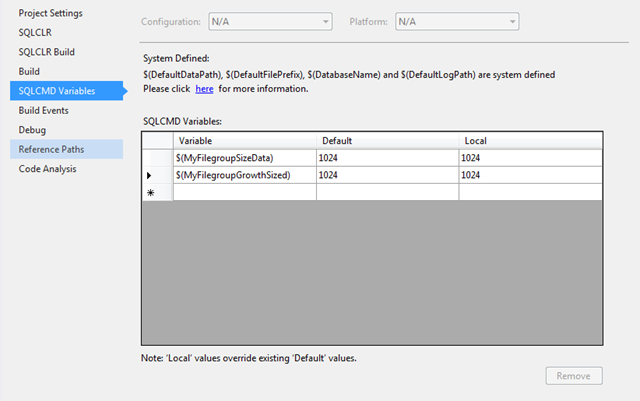
Over the years SQL Server database development has evolved from non-structured tools (Query Analyser/Management Studio) to fully structured development tools (Visual Studio Database Professionals/SQL Server Data Tools). However there many important aspects of database development which hasn't changed over the years. One of which I would like to cover within this blog post is the database files configuration especially within Microsoft development tools: SSDTS and VSDB-Pro. Getting your database files size and growth incorrectly configured can hurt your database performance. As on a project we had our first test release into production of our data warehouse and run our ETL process. At the time the databases had to take on the default file settings of the model database. After the process completed within three hours our data base files all grew in excess of 40GB. We did another test release, after tearing down the environment, with database file settings worked into the deployment ...

Waking up Reporting Services with scripting

I have recently deployed a new reporting solution using SQL Server 2008 Reporting Services. I wanted to look into a solution to ensure that the first user, after reporting services had spun down its’ application pools, doesn't have to wait for them to be re-initiated. This so that I could avoid complaints about reporting services performance. I was looking for a simple solution to either stop reporting services clearing down the application pools or to find a way of speeding up the first request. I decided on an approach to speed up the first request made by a user. This was because I didn't want to make application settings changes in case other problems occurred. After searching for a method into speeding up reporting services application pools start-up I came across a useful PowerShell script. The script, which was for PowerShell V2, made use of the .Net class System.Net.WebRequest to make a request to the report manager. I made a copy of this script and applied some ...

Couple of Tips for an External Activator

I recently had to review a solution that was designed to keep an Oracle database up to date with changes made within a SQL Server database. The solution was implemented by using CDC, Service Broker and an External Activator to process the messages. Within this post I would like to share a couple of tips that I gave to help improve the efficiency of the External Activator process. Tip 1: Avoid the temptation for checking to see if there are messages to process. Especially at the starting of the External Activator, as the programme is only launched when there are messages to be read. The only way to check if there are existing messages is to run a select command doing a count on the queue. This is a wasted call to the database server and depending on the number of messages within the queue this could be an intensive query to run . Also attempting to read an empty queue does not cause an error within SQL The best way to check if there are still messages to be processed is by using...

Missing the option of creating table dependent objects within separate files

I have been developing database for over 12 years for use with applications and business intelligence projects. One of the challenges I used to face was how to put the SQL Server database under source control.  Over the years I came across several methods: Direct Database development with nightly backup,  Script(s) place under source control, SSMS Projects.  Microsoft help to solved the problem when they release Visual Studio Data Database Professional (DataDude), when Visual Studio 2005 was around,  which add a project structure, development methods, build and deployment methods.   Recently Microsoft has release a new replacement database development tool: SQL Server Data Tools, which has some improvements and some missing features.  One of the missing features is the folder structure choice that which I talk about in another post :  http://zogamorph.blogspot.co.uk/2012/06/how-to-create-old-database-project.html .  Another change is the dr...